
Last updated on
Oct 30, 2026
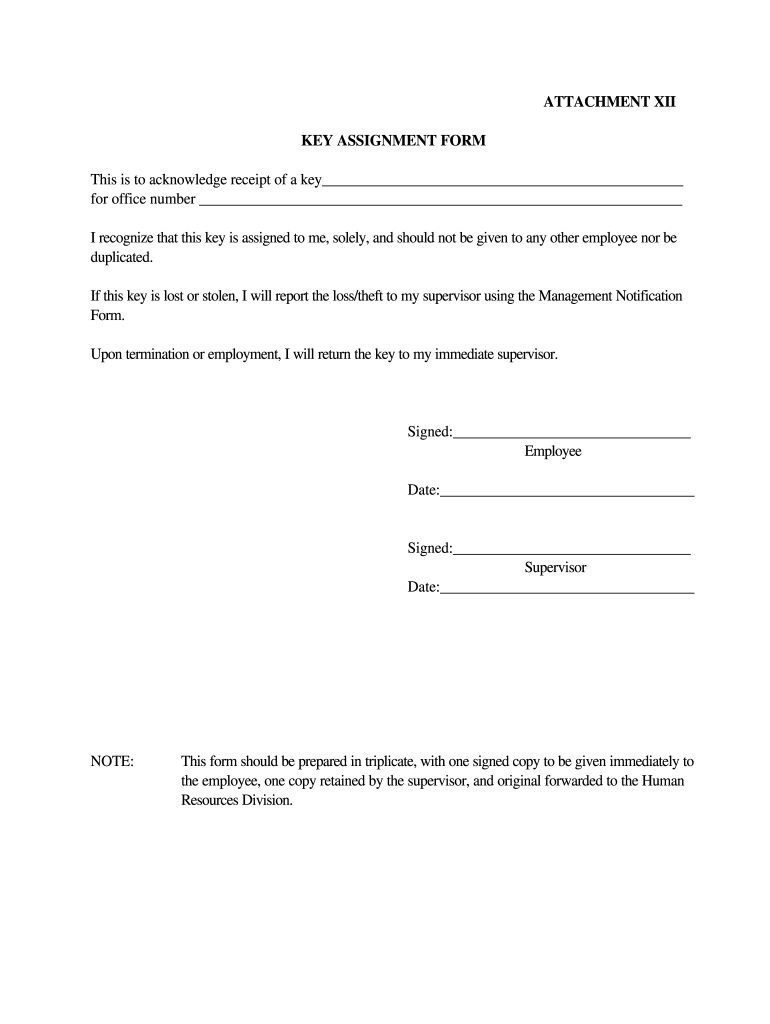
LA Key Assignment Form free printable template
pdfFiller is not affiliated with any government organization

Fill out
Complete the form online in a simple drag-and-drop editor.

eSign
Add your legally binding signature or send the form for signing.

Share
Share the form via a link, letting anyone fill it out from any device.

Export
Download, print, email, or move the form to your cloud storage.
Why pdfFiller is the best tool for your documents and forms


End-to-end document management
From editing and signing to collaboration and tracking, pdfFiller has everything you need to get your documents done quickly and efficiently.
Accessible from anywhere
pdfFiller is fully cloud-based. This means you can edit, sign, and share documents from anywhere using your computer, smartphone, or tablet.
Secure and compliant
pdfFiller lets you securely manage documents following global laws like ESIGN, CCPA, and GDPR. It's also HIPAA and SOC 2 compliant.
What is LA Key Assignment Form
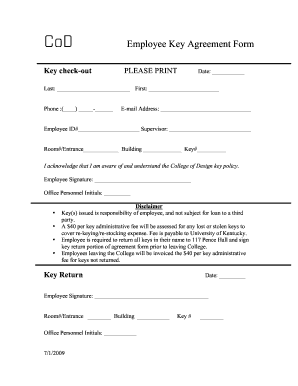
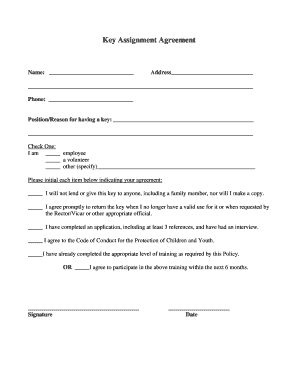
The Key Assignment Form is a business document used by employees and supervisors to acknowledge the receipt of office keys and ensure secure handling of these keys.
pdfFiller scores top ratings on review platforms




The most incredible tool i have used for school.
For example, the exhibits in my court Motion were in various formats and its amazing how it handled the various formats and converted them to PDFs flawlessly
Who needs LA Key Assignment Form?
Explore how professionals across industries use pdfFiller.

LA Key Assignment Form is needed by:
-
Employees receiving office keys
-
Supervisors overseeing key distribution
-
Human Resources personnel managing employee records
-
Facilities management staff for office security
-
Compliance officers ensuring security protocols are followed
-
IT staff needing access to secure areas
Comprehensive Guide to LA Key Assignment Form
What is the Key Assignment Form?
The Key Assignment Form is a critical document in office environments that serves various functions. Its primary role is to ensure employees accurately acknowledge the receipt of physical keys, which is essential for maintaining accountability within the workplace. By requiring this form, organizations enhance security and mitigate the risks associated with lost or shared keys, thereby safeguarding the office premises.
Purpose and Benefits of the Key Assignment Form
A crucial aspect of the Key Assignment Form is its role in confirming that employees have received their office keys. This ensures a clear legal understanding that the recipient agrees not to share or duplicate the keys, thus reinforcing security protocols. Furthermore, the form provides a systematic reporting mechanism for any lost or stolen keys, enabling swift action to protect office assets and sensitive information.
Key Features of the Key Assignment Form
This form includes several important components that facilitate its use. Major features encompass fillable fields for essential information and the necessity for both employee and supervisor signatures to validate the agreement. To streamline record-keeping, the form is typically prepared in triplicate, with copies distributed to the employee, their supervisor, and the Human Resources Division. Additionally, the option for online completion simplifies the process, making it user-friendly.
Who Needs the Key Assignment Form?
The Key Assignment Form is essential for various roles within an organization. Employees receiving office keys and their supervisors must participate in the signing process to verify accountability. This form is typically utilized in scenarios involving new hires, any changes in office equipment, or modifications to roles that require different access levels.
How to Fill Out the Key Assignment Form Online
Filling out the Key Assignment Form online through pdfFiller is straightforward. Follow these steps:
-
Access the form via the pdfFiller platform.
-
Complete all required fields, ensuring accuracy.
-
Pay particular attention to signature fields, ensuring they are duly signed by both the employee and supervisor.
-
Review and validate all entered information before submission.
This process aids in preventing errors and improves the overall efficiency of form completion.
Required Documents and Supporting Materials
When completing the Key Assignment Form, various documents may be required to ensure a smooth process. These might include:
-
Identification verification for the employee.
-
Previous agreements regarding key usage, if applicable.
-
HR documentation indicating office changes affecting key access.
The inclusion of these documents helps contextualize the Key Assignment Form and provides necessary background for proper processing.
Submission Methods for the Key Assignment Form
Submitting the completed Key Assignment Form can be done through multiple channels. Employees can choose to submit it physically or electronically via pdfFiller. It is crucial for employees to retain copies of the submitted form for personal records as well as for HR documentation. pdfFiller employs stringent security measures to protect these document submissions, ensuring confidentiality throughout the process.
Common Errors and How to Avoid Them
Users often encounter several common mistakes when filling out the Key Assignment Form. To avoid these errors, it is recommended to:
-
Double-check that all required fields are completed.
-
Ensure that the correct signatures are obtained before submission.
-
Validate information against official records to prevent discrepancies.
By following these guidelines, users can significantly increase the likelihood of successful submission without complications.
Importance of Security and Compliance
Maintaining the confidentiality of sensitive information during the completion of the Key Assignment Form is crucial. pdfFiller prioritizes security by implementing measures such as 256-bit encryption and compliance with regulations like HIPAA and GDPR. These protocols are designed to protect users' data and ensure that information remains secure throughout the process.
Get Started with pdfFiller to Complete Your Key Assignment Form
Users can take advantage of pdfFiller’s robust features for efficiently completing the Key Assignment Form. The platform allows for easy filling, signing, and secure sharing of documents. Creating an account provides access to comprehensive benefits related to document management and editing, ensuring users can efficiently handle all their form requirements.
How to fill out the LA Key Assignment Form
-
1.To begin, access pdfFiller and use the search feature to locate the Key Assignment Form.
-
2.Open the form by clicking on it to launch the pdfFiller editor.
-
3.Before filling out the form, gather necessary information such as key holder details, office locations, and supervisory approval.
-
4.Navigate through the form's fillable fields, entering required information like employee name, supervisor name, and office key information.
-
5.Ensure to read any predefined terms or agreements regarding key handling within the document.
-
6.After completing the form, carefully review all provided information for accuracy.
-
7.Check that both the employee and supervisor fields are signed using pdfFiller’s signature tool or by uploading scanned signatures.
-
8.Finalize the document by saving it as a PDF, which allows you to download or send the form directly from pdfFiller.
-
9.Consider keeping a copy for personal records before submitting to the relevant department.

Who is required to sign the Key Assignment Form?
Both the employee receiving the key and their supervisor must sign the Key Assignment Form to acknowledge receipt and agreement not to share or duplicate the key.
How do I submit the completed Key Assignment Form?
Once completed and signed, the Key Assignment Form should be submitted to your Human Resources Division or the designated department overseeing key distribution.
Are there any penalties for losing the office key?
Yes, failing to report a lost or stolen key may result in disciplinary actions according to company policy. It is essential to report any loss immediately.
Can this form be filled out electronically?
Yes, the Key Assignment Form can be filled out electronically using pdfFiller, allowing for easy access and submission.
What should I do if I notice a mistake on the form after submission?
If a mistake is found after submission, contact your supervisor or HR immediately to rectify the issue as soon as possible.
Is notarization required for this form?
No, the Key Assignment Form does not require notarization under typical circumstances; it necessitates only the signatures of the employee and supervisor.
What happens if the supervisor is unavailable to sign?
If the supervisor is unavailable, it's advisable to consult your HR department for guidance on how to proceed with the Key Assignment Form in their absence.
Related Content
Related Forms



Related Catalogs
Get the latest insights from our blog


If you believe that this page should be taken down, please follow our DMCA take down process
here
.
This form may include fields for payment information. Data entered in these fields is not covered by PCI DSS compliance.